
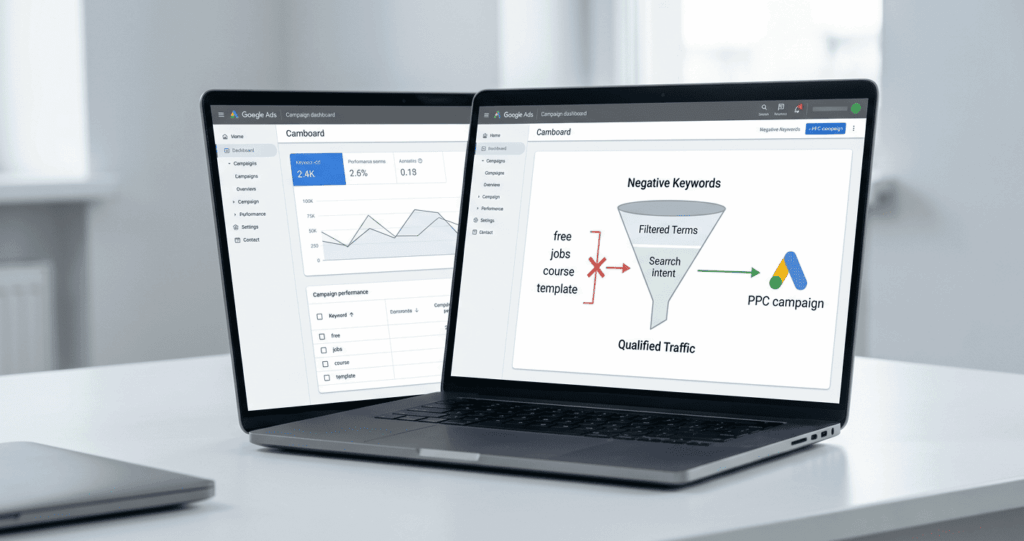
Many PPC campaigns lose money not because the offer is weak, the landing page is broken, or the ads are badly written. They lose money because ads appear for the wrong searches.
Google Ads negative keywords are search terms you exclude from campaigns to stop your ads from showing for irrelevant queries. When used correctly, negative keywords in Google Ads improve targeting, protect budget, increase click quality, and reduce wasted ad spend. A strong negative keyword list helps your campaigns focus on users who are more likely to buy, book, request a quote, or take the next meaningful step.
Google defines a negative keyword as a keyword type that prevents an ad from being triggered by a specific word or phrase.
What Are Google Ads Negative Keywords?
Google Ads negative keywords are words or phrases that stop ads from showing when a search does not match your campaign goal. They are not keywords you want to target — they are keywords you want to block.
For example, a company selling premium PPC management services may find value in searches like "Google Ads agency" or "hire Google Ads expert." But searches like "free Google Ads course," "Google Ads jobs," or "PPC salary" do not match the goal of selling paid services.
A negative keyword list might include terms such as:
- free, trial, sample, cheap, giveaway
- jobs, salary, career, hiring, internship
- course, training, tutorial, class, lesson
- template, PDF, download, spreadsheet
- login, support, complaint, phone number
The exact list depends on the campaign. A software company, ecommerce brand, agency, local service business, and B2B consultant will all need different exclusions.
How Negative Keywords Affect Search Intent
Search intent is the reason behind a user's search. A search for "Google Ads agency" may show buying intent. A search for "Google Ads jobs" has a completely different intent — that user is looking for employment. Without negative keywords, both searches may appear loosely related to Google Ads, but from a business perspective they are not equal.
The goal is not to block every broad or low-cost term. The goal is to stop ads from appearing when the user's intent does not support the campaign objective.
Why Google Ads Negative Keywords Are Important for PPC Results
Reducing Wasted Ad Spend
Every irrelevant click uses budget. If a campaign pays for clicks from users who want free resources, jobs, tutorials, or support pages, that spend is unlikely to produce revenue. This matters especially for small and medium businesses with limited monthly budgets — a company spending $1,500 per month cannot afford to waste hundreds of dollars on searches that were never likely to become leads.
For businesses that need structured campaign setup and budget control, professional PPC management services can help improve targeting, keyword strategy, and ongoing optimization.
Improving Click Quality and Conversion Rates
Negative keywords do more than reduce costs. They improve campaign quality by helping the right people reach your ads. When irrelevant searches are filtered out, campaigns often see:
- Better click-through rate from more relevant impressions
- Fewer wasted clicks and higher conversion potential
- Cleaner search term reports
- More efficient budget allocation
- Better insight into what real buyers are searching for
A clean account gives you cleaner data. Cleaner data leads to better decisions.
Types of Negative Keywords in Google Ads
Google Ads supports three negative keyword match types for Search campaigns. They work differently from positive keyword match types.
Broad Match Negative
Broad match negative keywords block searches containing all selected terms in any order. However, if a search contains only some of the words, the ad may still show. For example, the broad negative free software may block "free cheap software" but not a search containing only "free."
Phrase Match Negative
Phrase negative keywords block searches that include the exact phrase in order. Extra words before or after are allowed, but the phrase itself must appear. For example, "free course" blocks "best free course" but not "course for free."
Exact Match Negative
Exact negative keywords block only the precise search term with no extra words. For example, [free course] blocks only the exact search "free course" and nothing else.
Phrase negatives usually give the safest level of control for most campaign scenarios. Choose match types based on how specific the exclusion needs to be.
How to Build a Negative Keyword List
Start with a Basic List Before Launch
A negative keyword list should be prepared before a campaign launches. Start with categories that commonly attract irrelevant traffic:
- Free-related: free, cheap, trial, sample, giveaway
- Job-related: jobs, salary, career, hiring, internship
- Education-related: course, training, tutorial, class, lesson
- Research terms: meaning, definition, examples, what is, how does
- Resource terms: template, PDF, download, spreadsheet, checklist
- Support-related: login, customer service, phone number, support, complaint
Every list should be customized to the business. Copying a generic list without checking campaign intent can damage performance — a training company may not want to exclude "course," and a recruitment agency may not want to exclude "jobs."
Use Search Term Reports to Expand the List
After the campaign starts, search term reports become the best source for finding new negative keywords. These reports show the actual searches that triggered your ads — and real users do not always search the way advertisers expect.
Reviewing search term data helps identify:
- Queries with no commercial intent
- Searches from job seekers or students
- Free-resource and competitor support queries
- Irrelevant locations or unrelated industries
- Searches that spend budget but never convert
The first few weeks of a campaign are especially important. During this period, search term reviews can quickly reveal where money is leaking.
How to Add Negative Keywords to Google Ads
Campaign and Ad Group Level
To add negative keywords: open your Google Ads account, select the campaign or ad group, go to the Keywords section, choose Negative keywords, add your terms, select the correct match type, and save. Monitor performance after each update.
Campaign-level negatives block a term across one campaign. Ad group-level negatives block a term only within a specific ad group — useful when a term is irrelevant in one context but not another.
Account-Level Negative Keywords
Account-level negative keywords exclude terms from every campaign in the account. Use them only for terms that are always irrelevant — such as jobs, free, internship, login, salary, and complaint. Be careful: a term that is irrelevant today may become useful later if the business launches a new offer.
Negative Keywords for Search and Performance Max Campaigns
Search Campaigns
Search campaigns give advertisers direct control over keyword targeting and negative keyword setup. These campaigns often have a higher cost per click, which means each irrelevant click is more expensive. Search campaigns should have both a launch negative keyword list and an ongoing search term review process.
Performance Max Campaigns
Performance Max uses automation across Google channels, so negative keyword control works differently. Negative keywords in Performance Max apply to Search and Shopping inventory only — they do not behave like a full manual keyword strategy across every placement and format.
For Performance Max, negative keywords should be combined with:
- Accurate conversion tracking
- Strong audience signals and clear creative assets
- Well-structured product feeds
- Brand exclusions where needed
- Landing pages aligned with user intent
Common Mistakes to Avoid
Adding Too Many Negatives Too Quickly
Overusing negative keywords can limit reach and block valuable searches. This often happens when advertisers react to individual words without checking intent. Blocking "cheap" may make sense for premium services, but some buyers search "cheap" while comparing prices before making a serious purchase.
Negative keywords should be based on evidence — use search term data, conversion data, and business context before making aggressive exclusions.
Ignoring Match Types
Using the wrong match type can block good traffic unintentionally. Common mistakes include using broad negatives when phrase negatives would be safer, blocking single words without checking context, adding account-level negatives that should only apply to one campaign, and forgetting to add plural or related versions when needed.
A term should only be added as a negative when it clearly does not match the campaign objective.
Final Checklist
Before Launching the Campaign
- Prepare a basic negative keyword list before launch
- Exclude job-related terms if employment searches are irrelevant
- Exclude free-resource terms if they do not support the funnel
- Choose the correct negative match type for each exclusion
- Use account-level exclusions only for always-irrelevant terms
- Confirm exclusions do not block important buying-intent searches
After the Campaign Starts
- Review search terms weekly during the early phase
- Add irrelevant queries as negatives based on real data
- Monitor conversion rate changes after each update
- Check whether good traffic is being accidentally blocked
- Compare wasted spend before and after optimization
- Keep a record of major exclusions and the reason for each one
Conclusion
Google Ads negative keywords are essential for improving campaign quality, reducing wasted ad spend, and reaching users with stronger buying intent. Build your list around search intent, campaign goals, and real search term data. Use match types carefully. Review account-level exclusions before applying them widely. Treat Performance Max differently from standard Search campaigns.
Negative keywords should not be treated as a one-time setup. Search behavior changes, campaigns evolve, and new irrelevant queries appear. A strong negative keyword strategy keeps PPC campaigns focused, cost-efficient, and aligned with real business goals.
Need Expert Help Managing Your Google Ads?
Get professional PPC management that improves targeting, reduces wasted spend, and focuses your budget on searches that convert.
View PPC Management Services →Frequently Asked Questions
Google Ads negative keywords are search terms that prevent your ads from showing for irrelevant queries. They help advertisers control where ads appear and avoid clicks from users who are unlikely to convert. For example, a business selling paid PPC services may exclude terms like free, jobs, or course to avoid unrelated traffic.
You should review and update your negative keyword list regularly, especially during the first weeks of a campaign. Weekly checks are useful for active campaigns because search term data can reveal irrelevant queries quickly. After the campaign becomes stable, monthly reviews may be enough depending on budget and traffic volume.
To add negative keywords, open your Google Ads account, select the campaign or ad group, go to the Keywords section, and choose Negative keywords. Then add the terms you want to exclude and select the right match type. Negative keywords can be added at campaign, ad group, or account level.
Negative keywords can help improve traffic quality in Performance Max campaigns, but the level of control may differ from standard Search campaigns. Since Performance Max uses automation across multiple Google channels, advertisers should combine negative keyword strategy with strong audience signals, clear assets, and conversion tracking.
Negative keywords reduce wasted ad spend by stopping ads from appearing for searches that do not match your offer. This helps avoid paying for clicks from users looking for free resources, jobs, tutorials, or unrelated services. As a result, your budget can be focused on higher-intent searches with better conversion potential.