
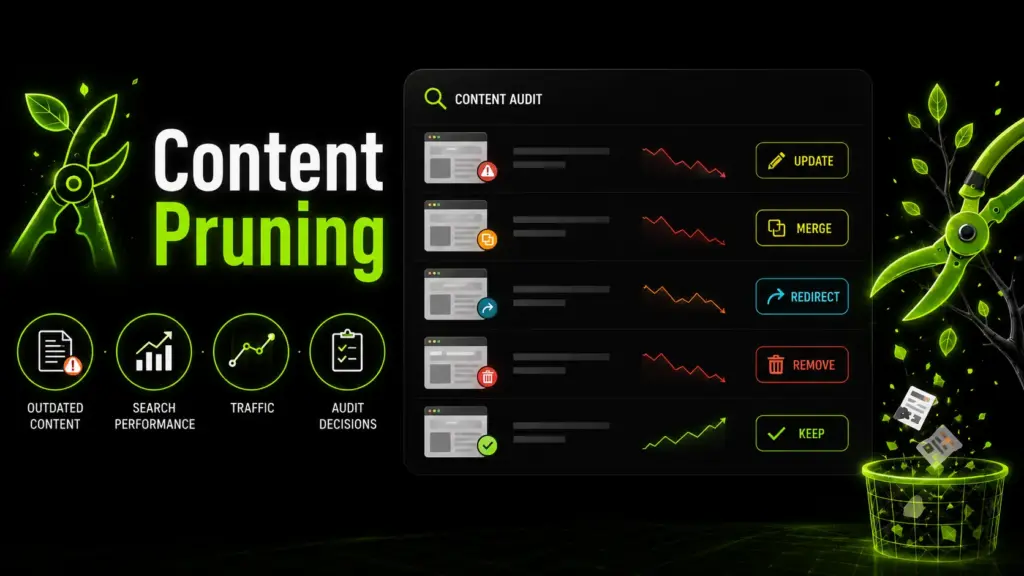
Content pruning is the process of reviewing existing website content and deciding whether each page should be updated, merged, redirected, deleted, or kept. It is not simply removing old blog posts. A smart pruning process uses data, search intent, and business value to improve site quality. When done carefully, content pruning can help search engines and users focus on your strongest pages instead of weak, outdated, or duplicated content.
What Is Content Pruning?
Content Pruning Meaning in Simple Terms
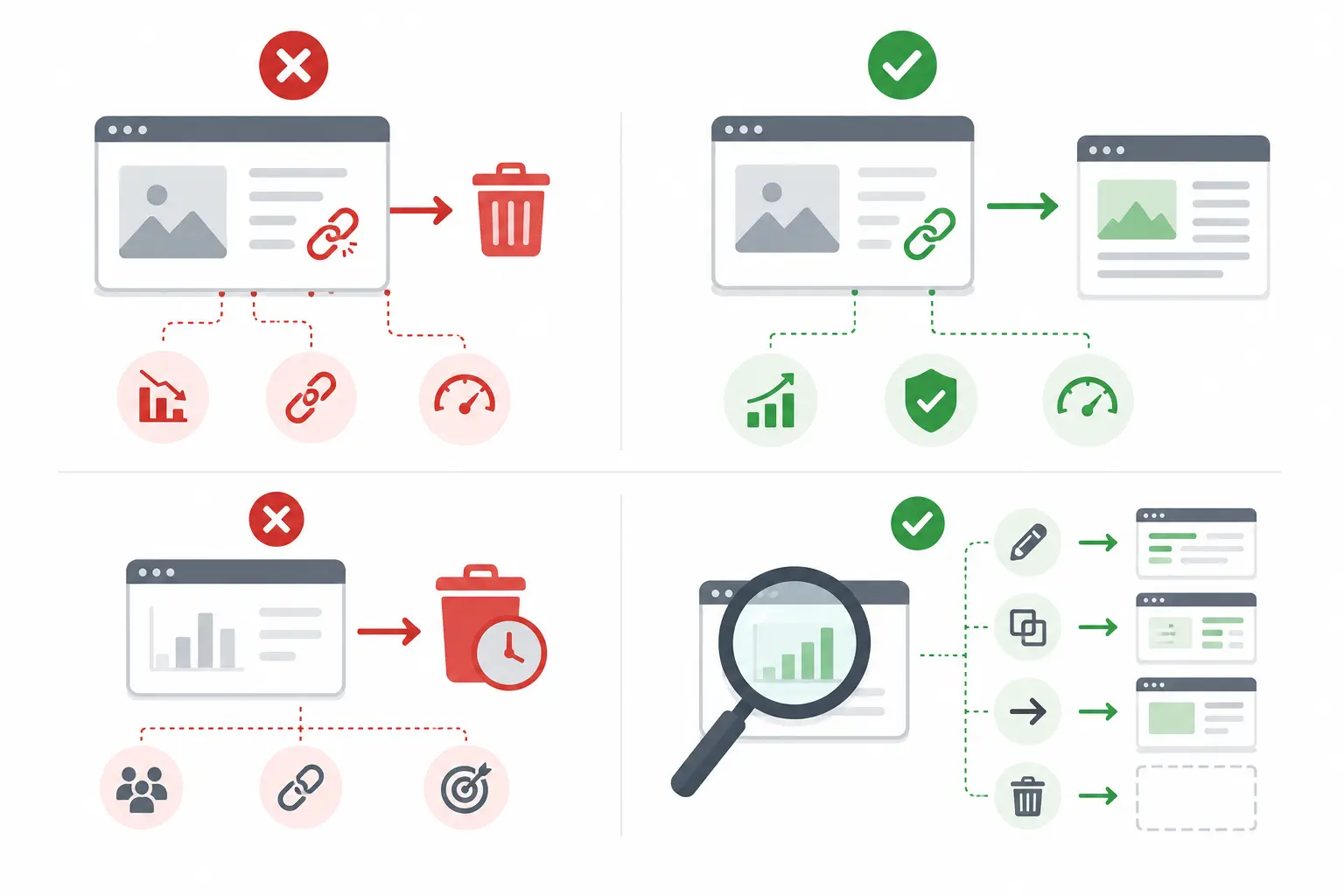
Content pruning means cleaning up your website content so every important page has a clear purpose. During this process, you review old URLs and decide what action each one needs. A page may need to be improved because the topic is still useful but the information is outdated. Another page may need to be merged because it overlaps with a stronger article. Some URLs may need redirects if they have backlinks or traffic history. Others may be deleted if they have no traffic, no links, no value, and no realistic future use.
The goal of content pruning is not to make your website smaller. The goal is to make it stronger.
How Content Pruning SEO Supports Better Site Quality
Content pruning SEO helps improve the overall quality of a website by reducing weak signals. If your site has hundreds of thin, duplicated, or irrelevant pages, search engines may struggle to identify your best content. Pruning helps by improving topical focus, strengthening important pages, reducing keyword cannibalization, removing or fixing outdated content, helping users find better information faster, and making internal linking more intentional. A healthy website should not only publish new content — it should also maintain and improve existing content.
Why Content Pruning Matters for SEO
Outdated Content Can Weaken Organic Performance
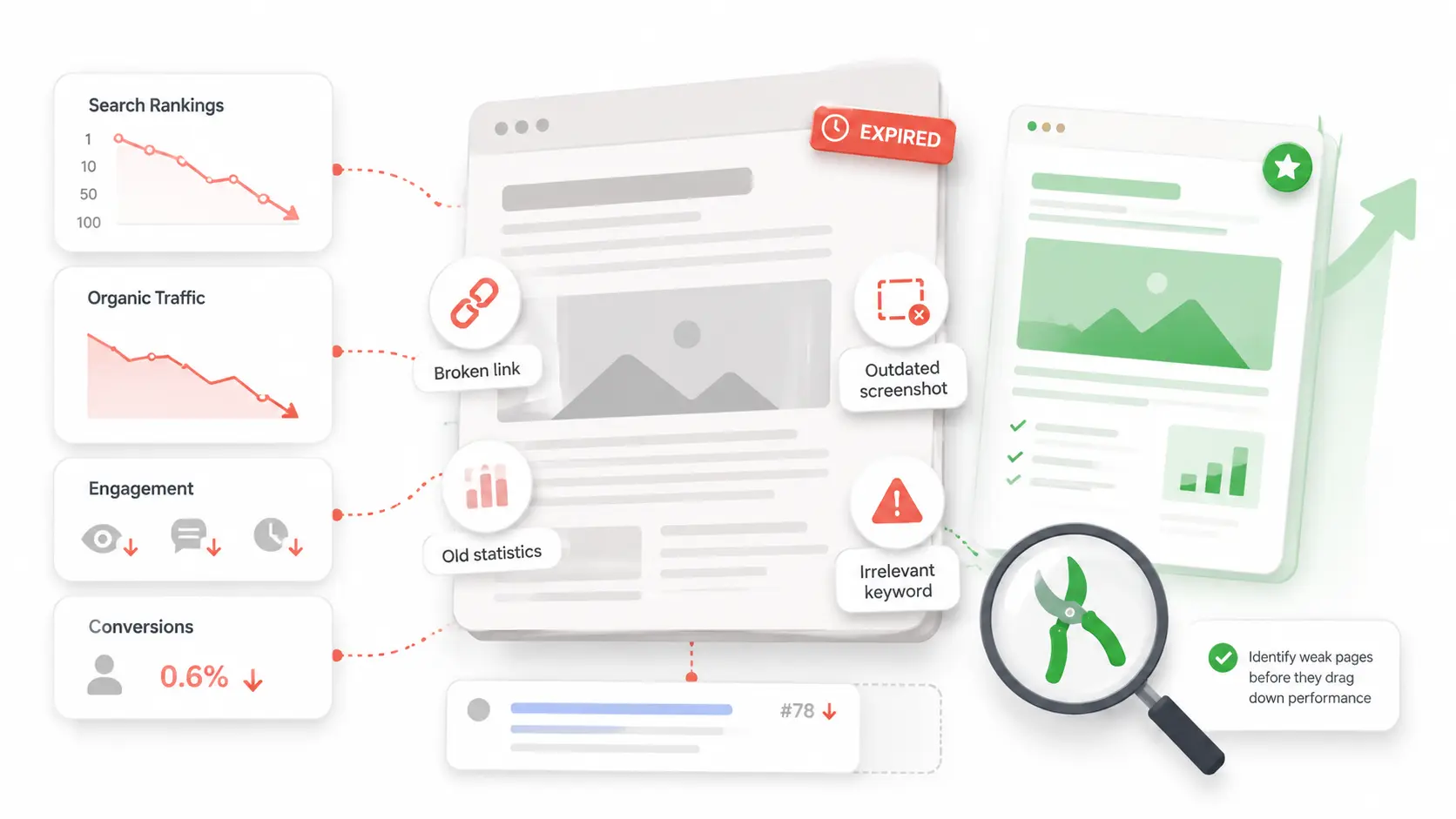
Outdated content can hurt SEO performance in several ways — it may include old statistics, broken links, outdated screenshots, expired offers, irrelevant keywords, or advice that no longer matches user intent. An old guide that once ranked well may lose visibility because competitors now provide more complete, current, and helpful information. In other cases, an outdated article may still attract clicks but fail to satisfy readers, leading to poor engagement and fewer conversions. Pruning helps you identify these pages before they continue dragging down performance.
Better Content Quality Can Improve Crawl Efficiency
Search engines crawl websites to discover, understand, and index pages. On small websites, crawl efficiency may not be a major issue. But on larger websites with many old URLs, low-value pages can waste attention that should go to stronger pages. A careful content audit can reveal pages that no longer deserve to be indexed — by improving, merging, redirecting, or removing them, you help search engines focus on content that is more useful, current, and aligned with your SEO goals.
How to Run a Content Audit Before Pruning
What to Check During a Content Audit
A content audit gives you the data needed to make safe pruning decisions. Without an audit, pruning becomes guesswork. Before updating old pages, a clear content brief can help you define the target keyword, search intent, headings, and missing content gaps.
- Organic traffic and click trends
- Keyword rankings and search impressions
- Backlinks from external websites
- Internal links pointing to and from the page
- Search intent match
- Content freshness and accuracy
- Conversion value and business support
- Duplicate or overlapping pages
- Indexing status in Google Search Console
- Engagement signals such as bounce rate and time on page
Tools You Can Use for a Content Audit
Useful tools for a content audit include Google Search Console, Google Analytics, Ahrefs, Semrush, Screaming Frog, and manual content review. Tools can show traffic, clicks, impressions, backlinks, crawl issues, and indexability. However, manual review is still important — a page may look weak in data but still have strong business value, while another page may get traffic but fail to match the right intent. The best audit combines numbers with human judgment.
How to Decide What to Update, Merge, Redirect, or Delete
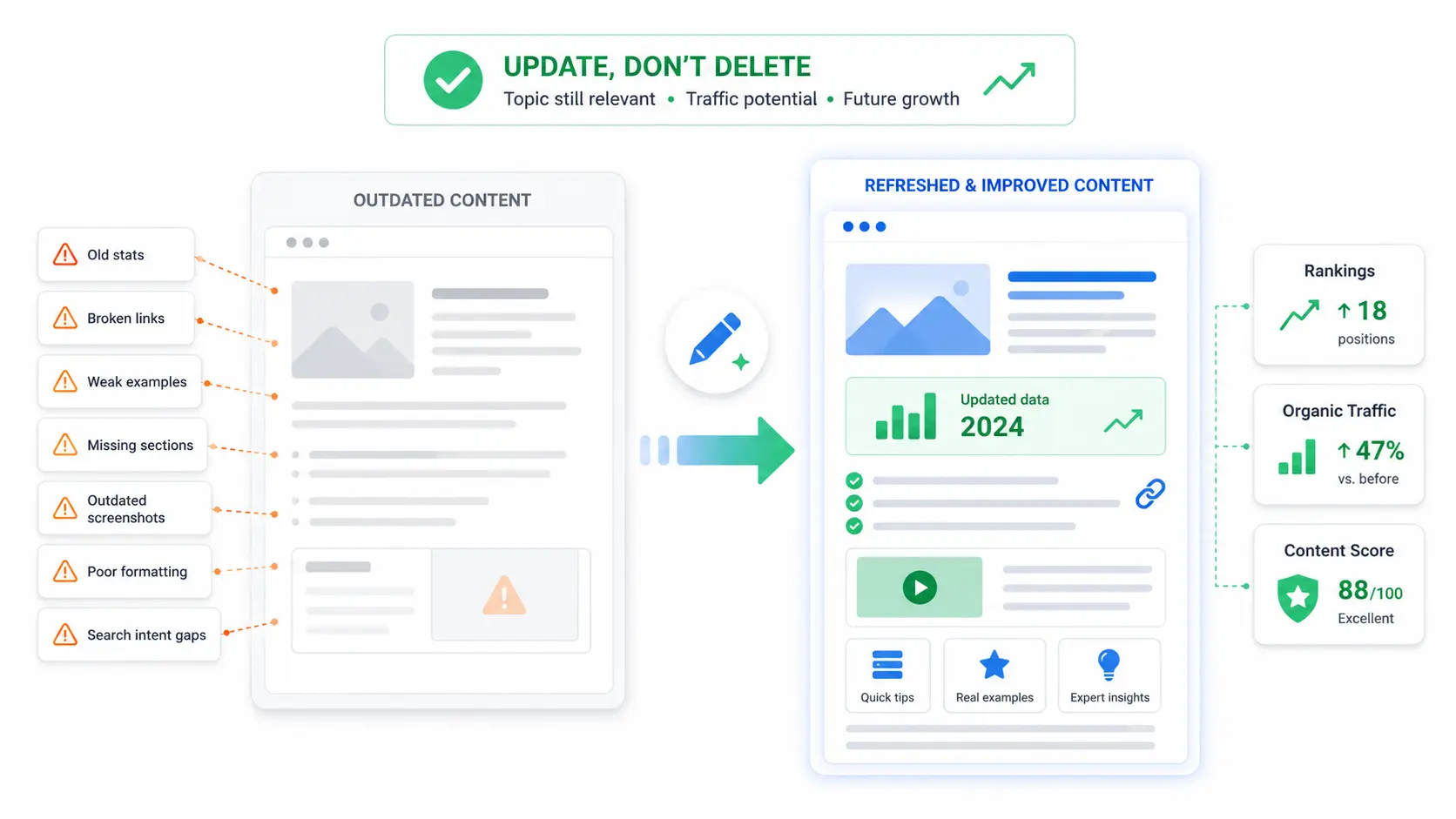
Topic is still relevant, but the page has outdated stats, broken links, weak examples, or missing sections. Rankings have dropped but potential remains.
Multiple URLs target the same topic or compete for similar keywords. Combine the best parts into one stronger, more complete guide.
The page has backlinks, traffic history, or a close replacement page. Redirect helps users and search engines reach the most relevant current URL.
No organic traffic, no backlinks, no conversions, no internal value, no relevant replacement, and no realistic update potential.
When to Update Old Content
Update old content when the topic is still relevant and the page has future potential. You may need to update old statistics, broken links, weak examples, missing sections, outdated screenshots, poor formatting, or search intent gaps. If an old page still targets a valuable topic but lacks depth, improving the copy through stronger content writing services may be better than deleting it.
When to Merge Similar Pages
Merge pages when multiple URLs target the same topic or compete for similar keywords. This often happens when websites publish many articles over time without a clear content strategy. For example, one site may have three separate posts about beginner SEO tips, all covering similar points. Instead of letting them compete, you can combine the best parts into one stronger guide. Merging helps reduce keyword cannibalization and creates a more complete resource for users.
When to Redirect a Page
Redirect a page when it has backlinks, traffic history, or a close replacement page. Use redirects when a deleted page has valuable backlinks, a merged article replaces an old URL, a product or service has moved, or the old page has a clear topical match elsewhere. Avoid redirecting everything to the homepage — redirects should feel useful and relevant.
When to Delete Content
Deleting may be appropriate when a page has no organic traffic, no backlinks, no conversions, no internal value, no relevant replacement, and no realistic update potential. Examples may include expired announcements, thin posts, duplicated pages, irrelevant topics, or low-quality articles that no longer support your website. Deletion should always be the final option, not the first action.
Content Pruning SEO Best Practices
Content Pruning Checklist
Use this checklist before making changes:
- Export all indexed URLs
- Collect traffic and ranking data for each page
- Identify outdated content using date and accuracy checks
- Review backlinks before deleting any URL
- Check keyword overlap and cannibalization
- Update valuable pages first
- Merge similar pages where overlap exists
- Redirect deleted URLs when relevant backlinks exist
- Monitor rankings after changes are made
- Repeat the process regularly on a set schedule
Keep Helpful Content, Not Just High-Traffic Content
Low traffic does not always mean low value. Some pages support conversions, answer sales questions, attract backlinks, or help existing customers. For example, a detailed support page may not rank for a high-volume keyword but may reduce customer confusion. A niche service page may bring little traffic but generate qualified leads. Content pruning should protect helpful content while improving weak pages that no longer serve users.
How Often Should You Prune Content?
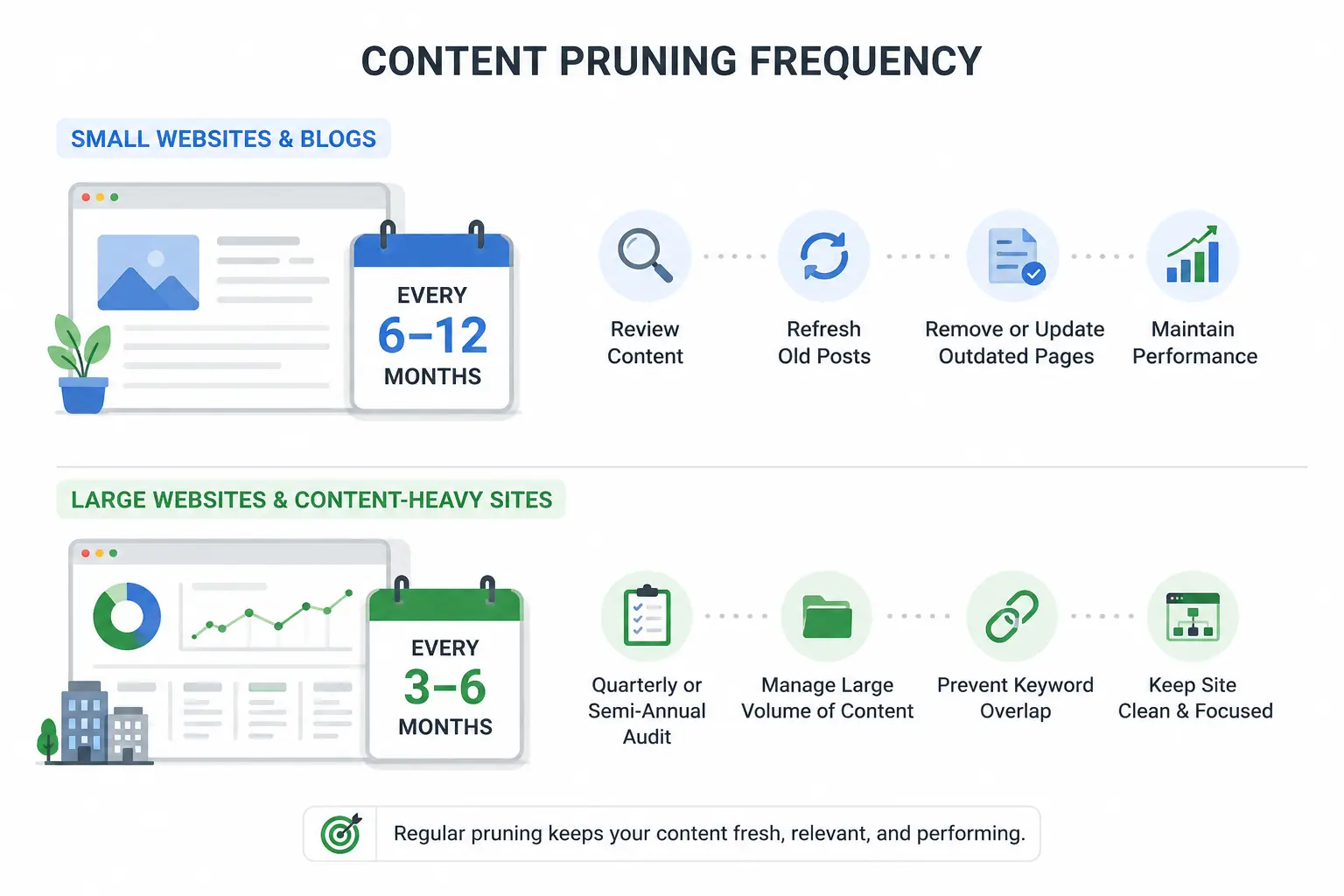
Review content every 6–12 months. Enough to catch outdated content, refresh older posts, and find pages that no longer fit. Regular maintenance based on performance and relevance.
Quarterly or semi-annual audits for ecommerce stores, SaaS blogs, and content-heavy sites. More frequent publishing means more outdated URLs that need monitoring.
Common Content Pruning Mistakes to Avoid
Final Thoughts on Content Pruning
Content pruning is not just deleting old posts. It is a practical SEO process that helps you review outdated content, improve useful pages, merge overlapping topics, redirect valuable URLs, and remove content that no longer supports your goals.
The safest approach starts with a content audit, not assumptions. Review each page carefully, protect URLs with value, and monitor performance after changes. When done regularly, content pruning can improve organic visibility, strengthen your best content, and keep your website fresh, focused, and useful.
Need Help Improving Your Existing Website Content?
Get professional content writing support to update, improve, and strengthen your most important pages — before they fall further behind.
View Content Writing Services →Frequently Asked Questions
Content pruning in SEO means reviewing existing website pages and deciding what to improve, merge, redirect, delete, or keep. The goal is to remove weak or outdated content while strengthening pages that still have value. It can improve site quality, search intent alignment, crawl efficiency, and organic visibility when handled carefully.
No, content pruning is not only deleting old content. Deleting is just one possible action. In many cases, updating, merging, or redirecting a page is a better choice. A good pruning process starts with a content audit, checks traffic and backlinks, and then chooses the safest action for each page.
Yes, content pruning can support better rankings when it improves overall content quality. Removing or improving outdated content can help search engines focus on stronger pages. However, pruning must be done carefully because deleting pages with traffic, backlinks, or business value can harm SEO if there is no proper plan.
A page may be deleted if it has no organic traffic, no rankings, no backlinks, no conversions, no internal value, and no realistic update potential. Before deleting, check whether the page can be improved, merged with another page, or redirected to a more relevant URL.
A content audit should usually be done every 6–12 months. If your website publishes content often, you may need to audit content every quarter. Regular audits help you find outdated content, keyword cannibalization, weak pages, and opportunities to update existing content before performance drops further.