
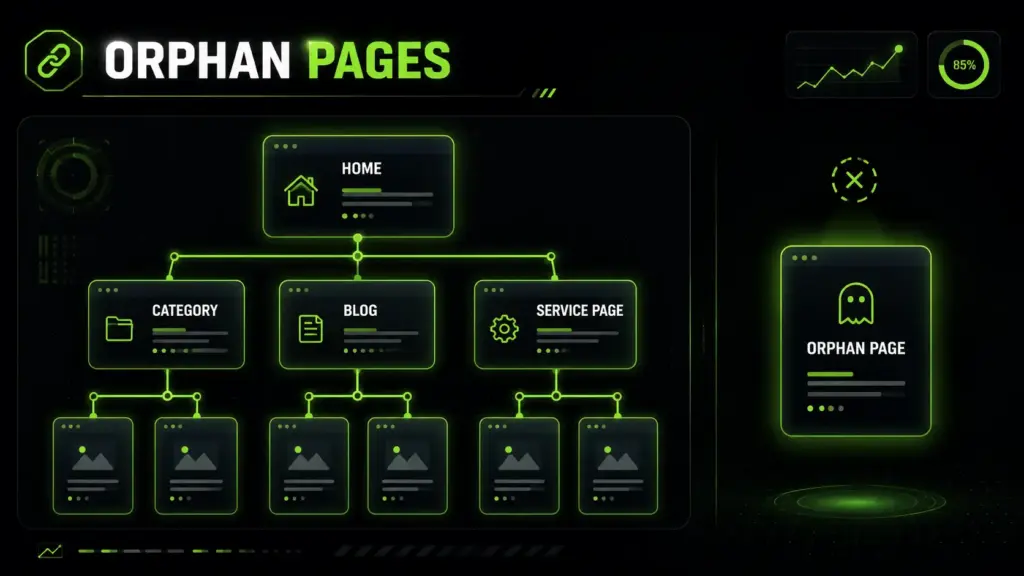
Orphan pages are one of the hidden technical SEO issues that can quietly weaken a website. These pages may exist, load properly, and even appear in search results, but they are not connected through internal links. As a result, users and search engines may struggle to discover them naturally.
This guide explains what orphan pages are, why they matter for SEO, how to find them, and how to fix them properly without damaging your website structure.
Table of Contents
What Are Orphan Pages in SEO?
Orphan pages are website pages that exist but do not have internal links pointing to them from other pages on the same website. They may still open when someone enters the URL directly, clicks a backlink, visits a sitemap link, or finds them in search results. However, they are not part of the normal website journey.
In SEO, this matters because search engines and users depend on links to discover content. A page without internal links can become difficult to crawl, understand, and rank. Even if the content is useful, it may not perform well because it is disconnected from the rest of the website.
Simple Definition of Orphan Pages
An orphan page is a live URL that is not linked from anywhere else on your website.
Think of your website as a city. Your homepage, category pages, blog posts, and service pages are like buildings connected by roads. Internal links are those roads. If one building exists but has no road leading to it, people may not find it easily. That disconnected building is similar to an orphan page.
These pages can still exist in different places. They may appear in your XML sitemap. They may receive traffic from old ads. They may have backlinks from other websites. They may even be indexed by search engines. But if users cannot reach them through menus, blog links, category pages, or contextual links, they are isolated.
How Orphan Pages SEO Issues Happen
Orphan pages SEO problems usually happen when a website grows without a clear content structure. A page gets published, but no one adds links to it. A campaign page is created quickly, but it never gets connected to the main site. A redesign changes navigation, and older URLs are left behind.
- Website redesigns
- URL migrations
- Deleted menu links
- Removed category pages
- Expired landing pages
- Poor blog internal linking
- Duplicate page cleanups
- Content pruning mistakes
- CMS publishing errors
The issue is not always that the page is bad. Sometimes the page is valuable, but it has been forgotten. That is why the goal is not only to find orphan pages, but also to decide what each one should become.
Why Orphan Pages Are Bad for Website Rankings
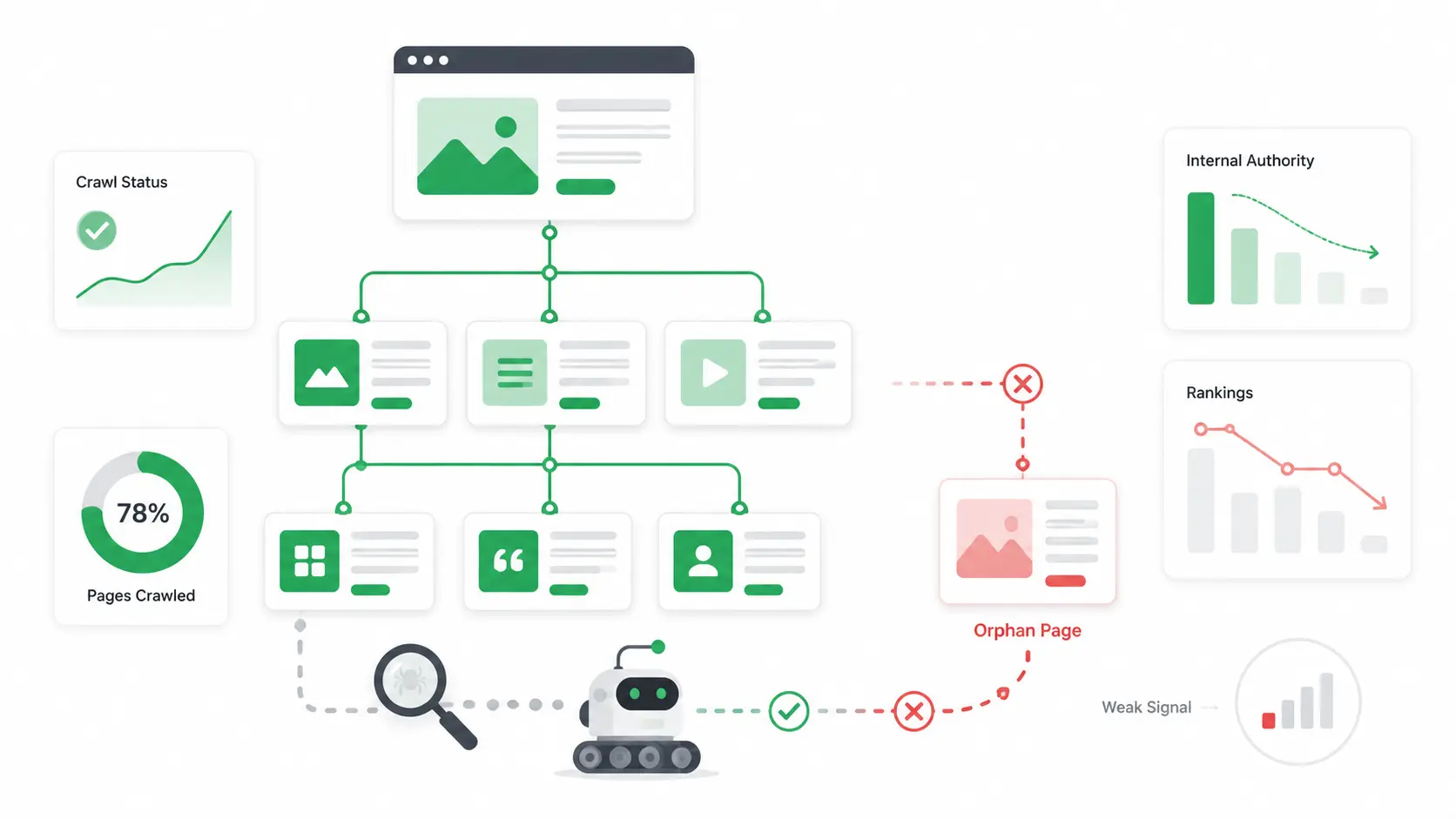
Orphan pages are bad for website rankings because they weaken discoverability, crawl paths, topical structure, and internal authority. Search engines use links to understand how pages relate to each other. When a page sits alone, it sends a weak signal about its importance.
A page may have strong content, but if it has no internal links, it is harder for search engines to connect it with the rest of your topic cluster. This can reduce its ranking potential and limit the SEO value of the work you have already created.
Orphan Pages Can Reduce Crawl Discovery
Search engines discover many URLs by following links. When important pages are not linked internally, crawlers may not reach them as easily or as often.
This does not always mean the page will never be found. If the URL is in a sitemap or has backlinks, it may still be discovered. But discovery alone is not the same as strong SEO performance. A page that is linked from relevant internal pages has clearer context and stronger signals.
For larger websites, this becomes more serious. Ecommerce sites, blogs, directories, and service-based websites often have hundreds or thousands of URLs. If important pages are buried or disconnected, crawl efficiency can suffer.
For complex sites, a professional technical SEO service can help detect orphan pages, crawl errors, indexation issues, and weak internal linking patterns before they damage organic visibility.
Orphan Pages Can Waste Valuable Content
Content takes time, money, and strategy to create. If a useful guide, service page, product page, or landing page is not linked internally, it may never reach its full potential.
- Helpful content receives little organic traffic.
- Search engines struggle to understand topic relationships.
- Users cannot naturally move from one relevant page to another.
- Important conversion pages remain hidden.
- Internal authority is not passed to pages that need it.
For example, a blog post may explain a common customer problem, while a service page offers the solution. If the blog post never links to the service page, users miss the next step. Search engines also miss a clear relationship between the informational and commercial content.
Good internal linking turns separate pages into a connected system. Orphan pages break that system.
Common Causes of Orphan Pages
Most orphan pages are created by accident. They are rarely the result of one big mistake. More often, they appear slowly as websites change, teams publish content, campaigns end, and old URLs are forgotten.
The larger and older a website becomes, the easier it is for disconnected pages to build up in the background.
Website Redesigns and URL Changes
Website redesigns are one of the most common causes of orphan pages. During a redesign, menus change, categories are renamed, old pages are replaced, and URL structures may be updated. If the team focuses only on the new design, older URLs can remain live but disconnected.
- Old service pages are removed from navigation.
- Blog category pages are changed.
- Internal links are deleted during content updates.
- URL paths are migrated without a full link review.
- Old pages are kept live “just in case.”
A redesign should improve the user experience, but it can harm SEO when internal links are not mapped carefully. Every important page needs a clear place in the new structure. If a page no longer deserves a place, it should be redirected, merged, removed, or noindexed based on its purpose.
Campaign Pages and Old Landing Pages
Campaign pages are another common source of orphan URLs. Businesses often create landing pages for ads, email campaigns, seasonal offers, webinars, product launches, or limited promotions.
These pages may not be linked from the main website because they were built for a specific audience. That is not always a problem. Some campaign pages are intentionally separate. But after the campaign ends, they are often forgotten.
An old landing page can become an SEO issue when it is thin, outdated, duplicated, or still indexed without a useful purpose. It may compete with better pages, confuse users, or create a poor impression of the brand.
When reviewing old campaign pages, ask one simple question: does this URL still help users or search performance? If yes, connect it properly. If not, clean it up.
How to Find Orphan Pages on Your Website
To find orphan pages, you need to compare URLs from multiple sources. A normal site crawl only finds pages that are linked internally. That means a crawler may miss disconnected URLs unless you also provide sitemap, analytics, CMS, or search data.
The best approach is to build a master URL list, then compare which pages are crawlable through internal links and which ones only appear in other sources.
Find Orphan Pages with Crawling Tools
A crawling tool shows which pages can be reached through your website’s internal links. Start by crawling your website from the homepage. Then compare those crawled URLs with other URL sources.
- XML sitemap URLs
- Google Search Console indexed pages
- Analytics landing pages
- CMS page lists
- Server log URLs
- Backlink tool exports
- Paid campaign landing pages
If a URL appears in your sitemap, analytics, CMS, or search data but does not appear in your crawl, it may be an orphan page.
This method is especially useful because it shows the difference between pages that exist and pages that are actually connected. A website can have hundreds of published pages, but only a portion may be reachable through normal internal links.
You can also learn how to use AI for SEO to organize content audits, group related pages, and discover internal linking opportunities faster.
Use an Orphan Page Checker for Faster Audits
An orphan page checker helps identify URLs that exist but are not reachable through internal links. This is useful when manual checking becomes too slow.
A good audit process should not rely on only one data source. For example, your sitemap may include URLs that are outdated. Analytics may include pages that received traffic months ago but are no longer important. Search Console may show indexed URLs that are not part of your current content strategy.
That is why the best workflow is comparison-based. Use an orphan page checker or crawler to compare crawlable URLs against sitemap URLs, analytics URLs, and search performance URLs.
- Large business websites
- Ecommerce stores
- Blogs with many old posts
- Lead generation websites
- Local service websites
- Sites after migrations
- Sites with many landing pages
The goal is not just to create a list. The goal is to understand which disconnected URLs are worth fixing.
How to Fix Orphan Pages Properly
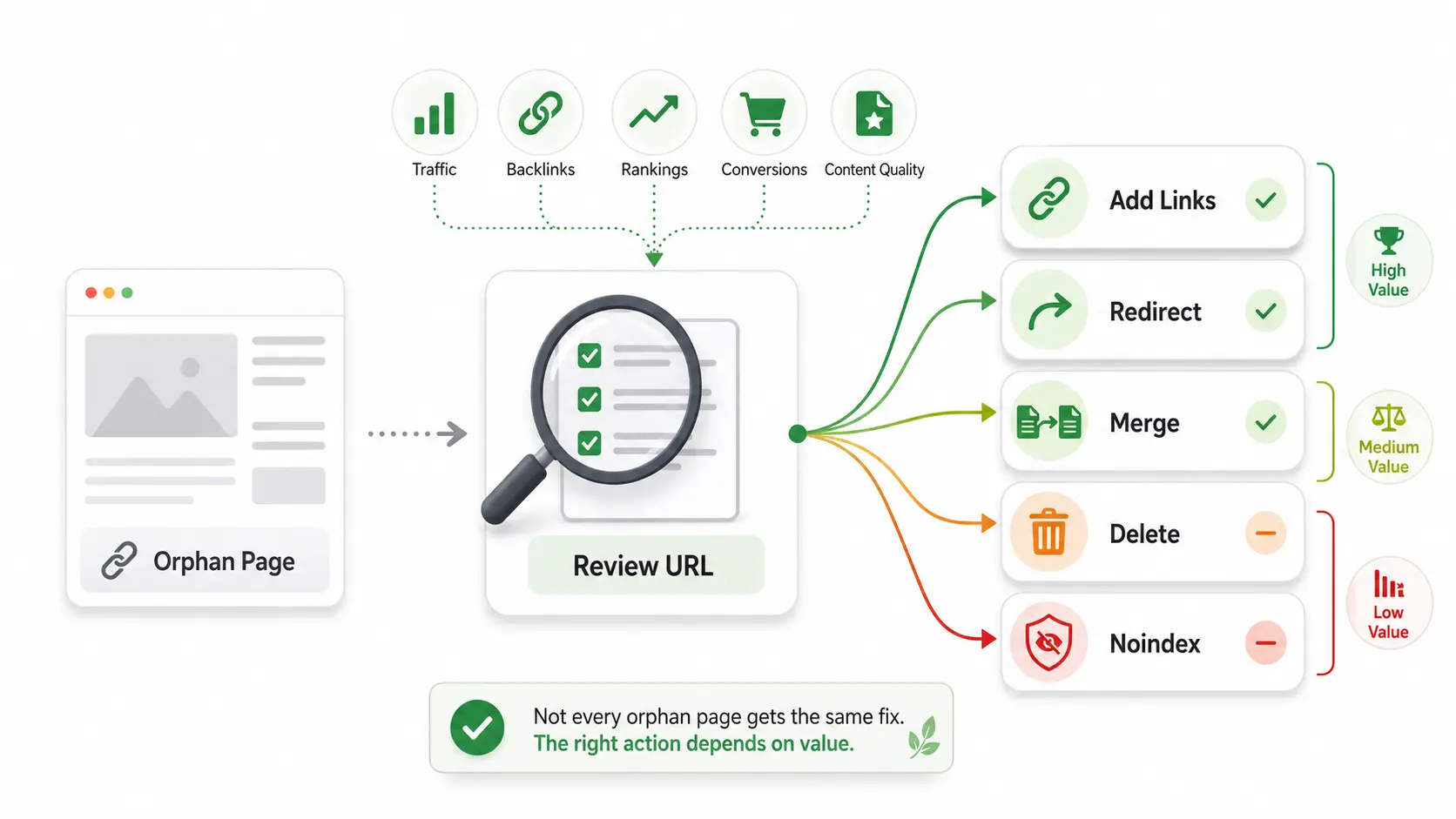
Fixing orphan pages does not mean linking to every disconnected URL. Some pages deserve internal links. Others should be redirected, merged, deleted, or kept out of the index.
The right fix depends on the value of the page. Before making changes, review each URL and decide whether it has traffic, backlinks, conversions, rankings, useful content, or a clear business purpose.
Add Relevant Internal Links to Orphan Pages
The best way to fix a valuable orphan page is to add relevant internal links from other pages.
These links should be useful for readers. Do not add links randomly just to satisfy an SEO checklist. A good internal link helps users continue their journey and helps search engines understand the page’s role.
- Related blog posts
- Service pages
- Category pages
- Resource hubs
- Navigation menus
- Footer sections
- Product pages
- Location pages
- FAQ sections
For example, if you have a detailed guide about technical audits, link to it from related SEO articles. If you have a service page that solves a problem discussed in a blog post, connect the two naturally.
Improving orphan pages often starts with stronger internal linking, better content structure, and clear on-page SEO services that help each page support the rest of the website.
Remove, Redirect, or Noindex Low-Value Pages
Not every orphan page should be saved. Some URLs are disconnected because they are old, duplicated, thin, or no longer useful.
In these cases, adding internal links may make the website worse. You do not want to send users or search engines to low-value content.
| Action | When to Use It |
|---|---|
| Keep and link | Use this when the page is useful, unique, relevant, and supports your SEO or conversion goals. |
| Merge | Use this when another page covers the same topic better and the orphan page overlaps too much. |
| Redirect | Use this when the page has backlinks or traffic but no longer needs to exist as a separate URL. |
| Delete | Use this when the page has no value, no traffic, no backlinks, and no clear purpose. |
| Noindex | Use this when the page should exist for users but should not appear in search results. |
Examples of pages that may not need indexing include thank-you pages, private offer pages, internal test pages, paid campaign variants, login pages, and temporary promotion pages.
A clean website is not only about having more pages. It is about having the right pages connected in the right way.
Best Tools to Use as an Orphan Page Checker
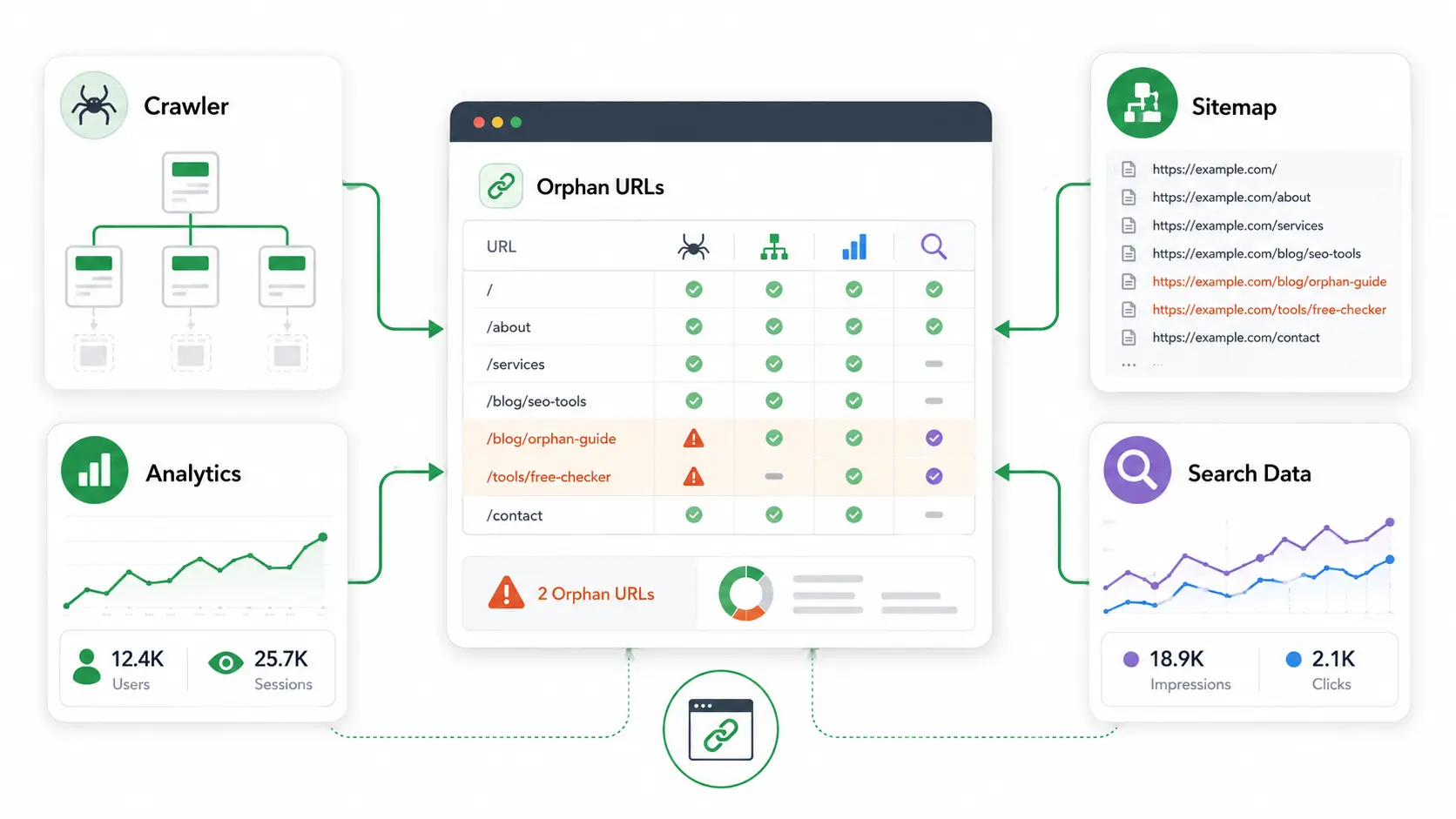
The best orphan page checker is not always a single tool. In many cases, it is a workflow that combines crawling, sitemap comparison, analytics data, and search performance data.
Different tools reveal different parts of the problem. A crawler shows what is internally reachable. A sitemap shows what you are asking search engines to discover. Analytics shows what users have visited. Search data shows what Google has seen.
SEO Crawlers and Sitemap Comparisons
SEO crawlers are useful because they show how your website is connected. When you crawl from the homepage, the crawler follows internal links and builds a list of reachable pages.
Then you can compare that crawl against your XML sitemap. If a URL is in the sitemap but not in the crawl, it may be disconnected from the site structure.
- Are all sitemap URLs internally linked?
- Are important pages buried too deep?
- Are old URLs still listed in the sitemap?
- Are category or service pages disconnected?
- Are internal links blocked, broken, or removed?
A sitemap should not be used to hide poor internal linking. If a page matters, it should be reachable through relevant internal links, not only listed in an XML file.
Analytics and Search Console Data
Analytics and search data can reveal hidden URLs that a basic crawl may not find.
For example, a page may receive visits from email campaigns, direct traffic, paid ads, social posts, backlinks, or old search results. If that page is not internally linked, it may still appear in analytics but not in your crawl.
This is why analytics landing page reports are helpful. They show which URLs users enter from outside your site. Search performance data can also show URLs that have impressions or clicks but may not be properly connected.
| URL Group | Recommended Action |
|---|---|
| Valuable pages | Add relevant internal links from related pages. |
| Outdated pages | Redirect them to the closest relevant alternative. |
| Thin pages | Improve the content or merge it with a stronger page. |
| Duplicate pages | Merge, canonicalize, or redirect depending on the page purpose. |
| Private pages | Noindex them if they should exist but not rank. |
| Temporary pages | Remove, redirect, or noindex after the campaign ends. |
This turns the audit from a technical task into a strategic SEO cleanup.
Orphan Pages SEO Checklist
A clear checklist makes the audit easier. Instead of guessing, you can move through each source, compare URLs, and assign an action to every disconnected page.
This is especially helpful after migrations, redesigns, content pruning, or large publishing projects.
What to Check During an Orphan Pages Audit
The most important part is the final step. After fixing issues, crawl the site again. This confirms that the pages are now reachable and that your internal links work as expected.
How Often Should You Check Orphan Pages?
Small websites can usually check for orphan pages every few months. A simple business website with stable pages may not create disconnected URLs very often.
Larger websites should review them more frequently. Ecommerce stores, active blogs, directories, and websites with ongoing campaigns should check after major updates.
- Website redesigns
- URL migrations
- Navigation changes
- Large content updates
- Blog cleanups
- Product launches
- Seasonal campaigns
- CMS changes
- Technical SEO fixes
The more often your website changes, the more often you should review internal linking. Orphan URLs are easier to fix when they are found early.
FAQs About Orphan Pages
What are orphan pages in SEO?
Orphan pages are website pages that exist but do not have internal links pointing to them from other pages. They may still be accessible through direct URLs, XML sitemaps, backlinks, ads, or search results. However, they are difficult for users and search engines to discover naturally because they are disconnected from the main website structure.
Why are orphan pages bad for SEO?
They can hurt SEO because search engines use internal links to discover pages, understand relationships, and evaluate importance. A page with no internal links may receive less crawl attention and weaker internal authority. Valuable content can also underperform because users cannot easily reach it from related pages, navigation sections, or topic clusters.
How can I find orphan pages?
You can find orphan pages by comparing URLs from your website crawl, XML sitemap, Google Search Console, analytics data, CMS exports, and old campaign lists. If a URL appears in your sitemap, analytics, or search data but does not appear in an internal crawl, it may be disconnected and should be reviewed.
What is the best way to fix orphan pages?
The best fix for valuable pages is to add relevant internal links from related blog posts, service pages, category pages, resource hubs, or navigation areas. If a page is outdated, duplicated, thin, or no longer useful, it may be better to redirect, merge, delete, or noindex it instead of linking to it.
Do all orphan pages need to be indexed?
No, not every disconnected page should be indexed. Some pages are intentionally separate, such as thank-you pages, paid campaign pages, test URLs, private offers, or login-related pages. Before fixing orphan pages, decide whether each URL has user value, SEO value, and a clear purpose within your website structure.
Final Thoughts
Orphan pages can quietly weaken a website because they hide useful content from users and make search engines work harder to understand your structure. The fix is not complicated, but it does require a careful audit.
Start by comparing crawled URLs with sitemap, analytics, CMS, and search data. Then decide whether each disconnected page should be linked, improved, redirected, merged, deleted, or noindexed. When valuable orphan pages are connected with relevant internal links, your website becomes easier to crawl, easier to use, and stronger for SEO.