
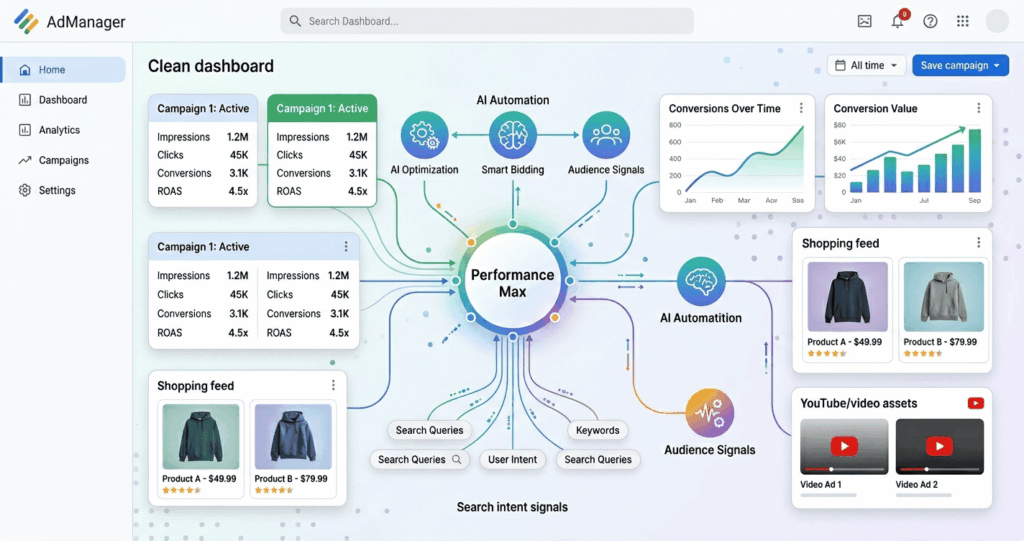
Performance max campaigns let you run ads across every Google channel, Search, Shopping, YouTube, Display, Discover, Gmail, and Maps, from a single campaign. This guide covers exactly how they work, how to set them up, and how to optimize them for real results in 2026.
01 What Are Performance Max Campaigns?
Performance max campaigns are one of the most powerful, and most misunderstood, tools in Google Ads today. If you've been wondering how to get more out of your ad budget without managing a dozen separate campaigns, this guide is for you.
In simple terms, performance max campaigns let you run ads across every Google channel from a single campaign. Google's AI handles where your ads appear, who sees them, and how much you bid in real time.
Unlike traditional Google Ads campaign types that require separate setups for different networks, Performance Max consolidates all placements into one campaign and uses Google's AI-driven automation to optimize performance based on your business goals.
Instead of spending hours managing five different campaign types, you give Google your assets and your goal, and the algorithm gets to work. The channels covered include Google Shopping, Search, YouTube, Display Network, Discover, Gmail, and Maps.
02 How Do Performance Max Campaigns Work?
Understanding how performance max campaigns Google Ads uses under the hood will help you get far better results than advertisers who treat it like a black box. PMax makes heavy use of artificial intelligence and machine learning to semi-automate bidding, placements, and ad delivery across diverse networks.
There are three core components that drive how PMax works:
Asset Groups
Instead of ad groups, PMax campaigns use asset groups, collections of headlines, descriptions, images, videos, and logos that Google dynamically combines to create ads optimized for different placements. The richer and more varied your assets, the more options Google has to test and optimize.
Audience Signals
Advertisers can provide audience signals to guide the algorithm, including customer lists (first-party data), website visitors, similar audiences, and search intent signals. Audience signals are not the same as audience targeting — you're not restricting who sees your ads. You're pointing the algorithm in the right direction, especially when a campaign is new and hasn't collected enough data.
Conversion-Driven Bidding
PMax campaigns focus on maximizing conversions by optimizing ad delivery in real time. Advertisers can choose Maximize Conversions, Target ROAS (Return on Ad Spend), or Maximize Conversion Value. For most businesses, starting with Maximize Conversions and shifting to Target ROAS once the campaign has gathered enough data is the recommended approach.
For a healthy ecommerce PMax campaign, aim for 60–80% of spend on Shopping. If Display or YouTube is consuming too much of your budget, your product feed likely needs optimization.
03 Key Benefits of Running PMax Campaigns
Google Performance Max campaigns offer several advantages over traditional campaign setups, especially for businesses that want scale without complexity.
Increased Reach & Visibility
PMax extends placements across Google's entire ecosystem, connecting you with customers at every stage of the buyer's journey.
Smarter Automation
Google's AI optimizes bidding, targeting, and placements in real time, minimizing wasted spend and improving efficiency.
Higher ROAS Potential
Automated bid strategies and dynamic placement adjustments are designed to increase conversions while maintaining efficient returns.
Streamlined Management
One campaign with a unified goal replaces multiple separate ones, saving time and reducing account complexity significantly.
Dynamic Creative Testing
Google automatically tests different combinations of headlines, descriptions, and images to find what resonates best with each audience.
Enhanced Audience Targeting
With audience signals, PMax leverages first-party data and user behavior insights to refine targeting and reach the most relevant prospects.
04 How to Set Up a Performance Max Campaign
Setting up your first Google Performance Max campaign is straightforward if you follow the right steps. Here's a clean overview of the process:
-
Define your campaign goal Be clear on your objective before touching any settings. Are you driving online sales, generating leads, or increasing store visits? PMax is built around a single conversion goal, so getting this right from the start matters.
-
Choose your bidding strategy Start with Maximize Conversions if your account has limited conversion history. Once you have 30–50 conversions per month, switch to Target ROAS or Maximize Conversion Value for more efficient scaling.
-
Set up your asset groups This is where most advertisers invest too little effort. Provide a diverse set of high-quality assets across all formats.Headlines (up to 15) Descriptions (up to 4) Images (multi-ratio) Videos (min. 1) Logos
-
Add audience signals Upload your customer email lists, website visitor audiences, and custom intent segments. These signals help the algorithm find similar users faster and shorten the learning phase.
-
Configure URL expansion and final URLs Make sure your landing pages are optimized for conversion. URL expansion allows Google to send users to the most relevant page on your site — powerful, but monitor it carefully.
-
Set your budget and launch Budget at least 10–15x your average cost per conversion per day. Launching with too tight a budget slows the learning phase significantly.
If you'd rather have a specialist handle the setup and ongoing management, our PPC ads management services are designed to maximize your ROI from day one.
Explore PPC Management Services →05 How to Optimize Performance Max Campaigns
Running a campaign is the easy part. Performance max campaign optimization is where the real work — and the real results — happen. Most advertisers who get poor results aren't making a setup error; they're making an optimization error.
Audit your asset performance regularly
Google Ads shows each asset's performance rating: Low, Good, or Best. Review these weekly. Replace "Low" assets with new creative variations and keep testing. Don't wait months to act on underperforming assets.
Use search themes to guide the algorithm
Search themes allow you to add keywords as guidance for the campaign. In 2026, search themes have expanded to 50 per asset group, giving you much more control over the queries your campaign targets without switching to a manual bidding setup.
Provide strong first-party data
The quality of your audience signals directly impacts how quickly and accurately the algorithm targets the right users. Regularly update your customer lists and segment them by value, high-value customers, recent purchasers, and lapsed customers, to give Google sharper signals.
Monitor channel-level spend
Check the Insights tab in Google Ads to see where your budget goes. For a healthy ecommerce PMax campaign, aim for 60–80% of spend on Shopping. If Display or YouTube is consuming too much budget, your shopping feed probably needs work.
Don't ignore your product feed (ecommerce)
For ecommerce, the product feed is everything. It determines which products show in Shopping ads, how Google matches your products to search queries, and how your ads look across channels. Invest time optimizing product titles, descriptions, images, and attributes before launching — and keep refining them.
Experiment with campaign segmentation
Separate products or services by margin, performance level, or audience type. Mixing high-margin and low-margin products in a single campaign often results in Google optimizing toward volume rather than profitability, and those are very different things.
Run PMax experiments
Google now offers a built-in experiment feature that lets you test PMax against other campaign types. Use this to validate whether PMax is truly driving incremental value in your account, rather than claiming credit for conversions that would have happened anyway.
06 Common Mistakes to Avoid
Even experienced advertisers make these errors when running performance max campaigns Google Ads. Knowing them in advance can save you weeks of wasted budget.
07 Frequently Asked Questions
These are the most common questions advertisers ask about performance max campaigns — answered clearly and concisely.
Performance Max campaigns are a goal-based campaign type that lets advertisers show ads across all of Google's channels, Search, Shopping, YouTube, Display, Discover, Gmail, and Maps, from a single campaign. They use Google's AI to automate bidding, placements, and creative delivery, optimizing in real time toward a specific conversion objective.
PMax campaigns work by combining your creative assets (headlines, images, videos) into asset groups, using audience signals to guide targeting, and applying machine learning to optimize bids and placements across Google's entire network. The algorithm learns from your conversion data and continuously adjusts to find the users most likely to convert.
Yes, for most advertisers, performance max campaigns are worth running — but results depend heavily on your inputs. Strong creative assets, accurate conversion tracking, well-structured audience signals, and a sufficient budget are all required for PMax to deliver meaningful results. Without these, the campaign underperforms regardless of how it's set up.
Typically, PMax campaigns need a learning period of 2–6 weeks before performance stabilizes. During this time, the algorithm collects conversion data and refines its targeting and bidding decisions. Avoid making major changes during the learning phase, as this can reset the process and delay results.
Yes, and many advertisers do. PMax and Search campaigns can run simultaneously in the same account. When both exist, Google gives priority to exact keyword matches in Search campaigns. PMax fills the gaps by targeting queries not covered by your Search campaigns and expanding reach across non-search channels.